The Problem
Volunteers are the backbone of animal shelters, responsible for daily care activities like walking, enrichment, and monitoring animal behavior. However, in many shelters, these workflows are supported by fragmented systems, including paper logs, whiteboards, and loosely structured digital notes.
This creates a number of challenges in practice:
Volunteers spend valuable time searching for information instead of interacting with animals
Care activities are inconsistently tracked across shifts
Important details (behavior notes, handling guidance, medical flags) can be missed or misinterpreted
Handoffs between volunteers rely heavily on verbal communication or incomplete logs
These inefficiencies are amplified by the environment itself. Volunteers are moving quickly between kennels and tasks, often relying on their phones in real time. Information needs to be immediately accessible, scannable, and actionable.
Over a six-week project, I explored how a mobile-first, volunteer-only product could streamline these workflows by reducing friction in how volunteers find, understand, and log information throughout their shift.
The Solution
I designed a mobile and tablet application focused on three critical volunteer needs:
Quick access to up-to-date animal information
Clear, consistent understanding of status and handling guidance
Fast, structured logging of care activities
Rather than digitizing existing processes, the solution reframes the experience around how volunteers actually work in motion.
Mobile-first foundation ensures the experience supports real-time use in the shelter environment
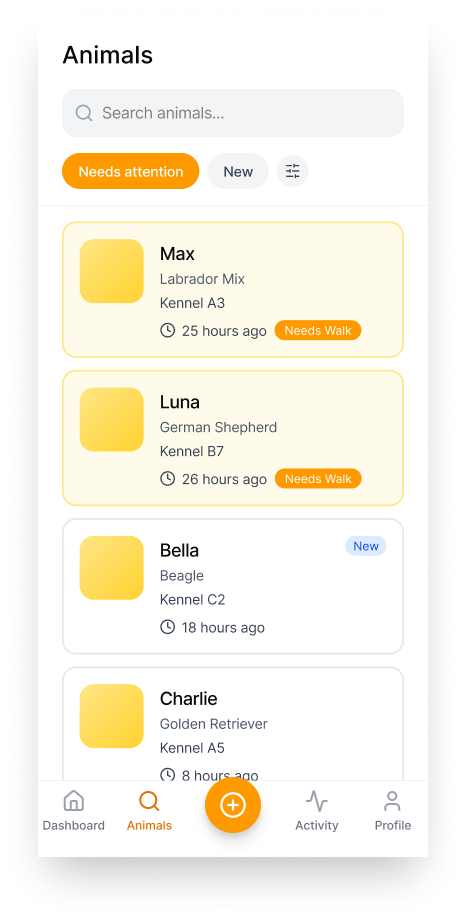
Search-first interaction model allows volunteers to quickly find animals without navigating complex menus
Structured logging reduces time spent entering information while improving clarity and consistency
Handoff visibility ensures key updates persist across shifts
My Role
I led interaction and product design for this concept from initial problem framing through wireframes. This included defining the product strategy, structuring core workflows, and translating research-informed insights into a mobile-first experience.
Responsibilities included:
Framing the problem space and defining key user workflows
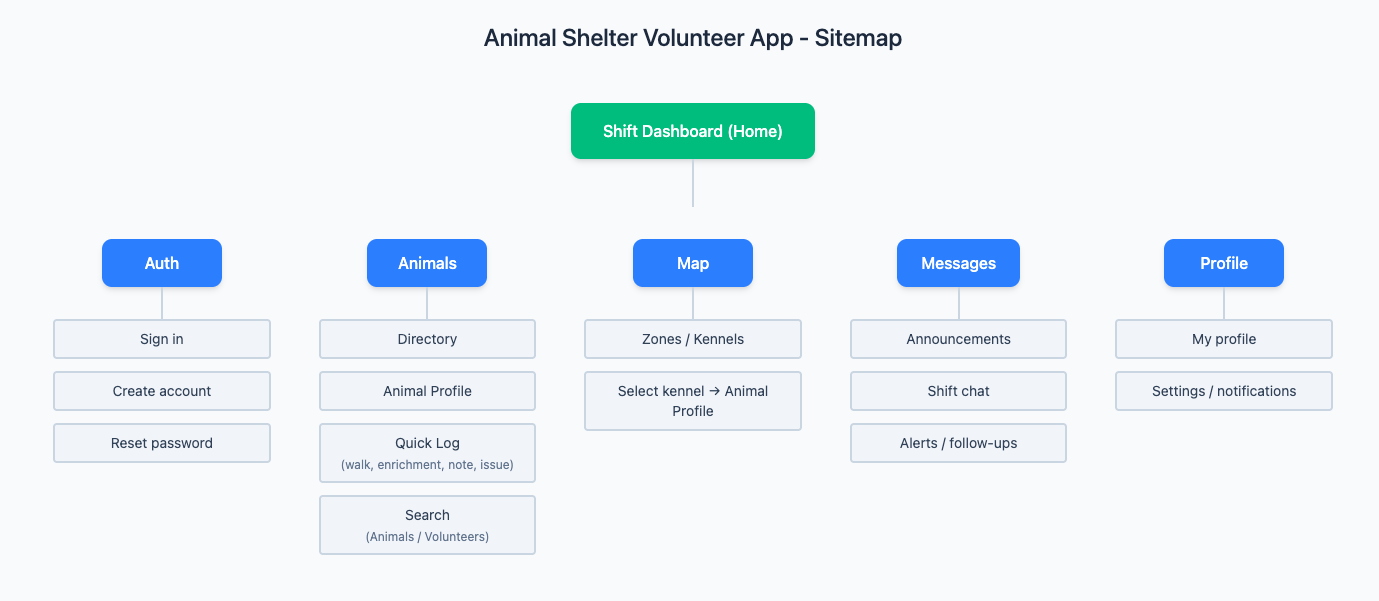
Developing the information architecture and sitemap
Designing mobile and tablet wireframes for critical interactions
Creating a research and validation approach to guide iteration
Applying structured content and data patterns to support usability and long-term scalability
Tools
Figma, Miro
Product Strategy
The product is designed around the natural flow of a volunteer shift:
Orient
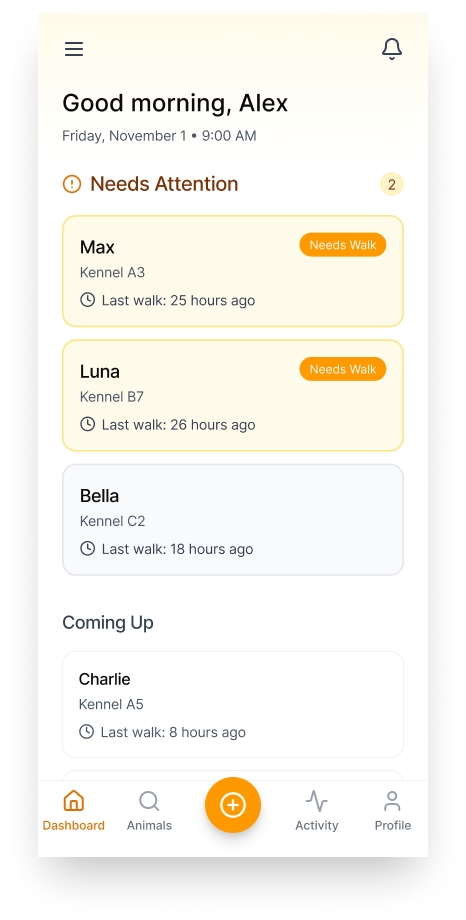
Volunteers quickly understand priorities:
Which animals need attention
What has already been completed
Any important alerts or updates
Act
Volunteers find animals through:
Search (primary behavior)
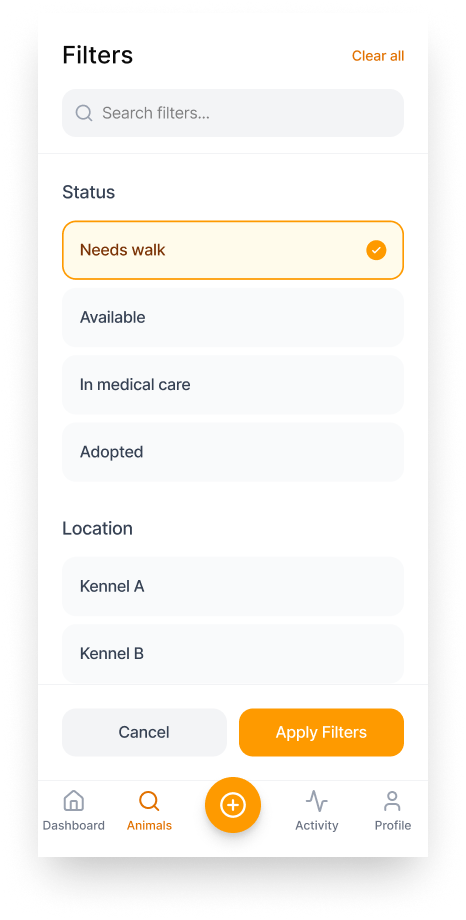
Directory with lightweight filtering
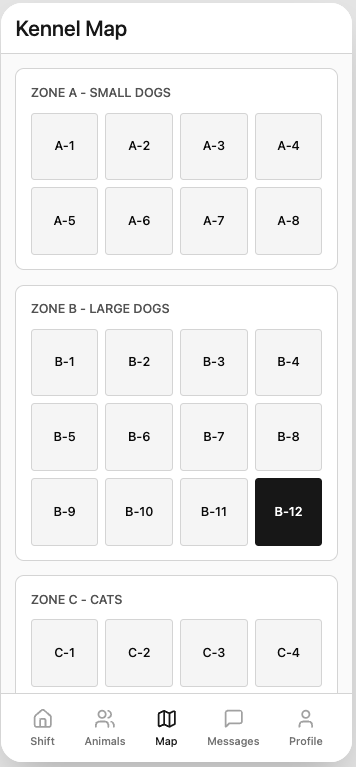
Kennel map for location-based navigation
Log
Care activities are captured in one simple flow:
Select action (walk, enrichment, note, issue)
Add structured context (tags or quick inputs)
Save with minimal effort
Key Design Decisions
Mobile-first by default
Designing for mobile forces prioritization of the most critical actions and reduces unnecessary complexity.
Search as a primary action
Because content is constantly changing, search becomes the fastest and most reliable way to access information.
Shallow, task-based navigation
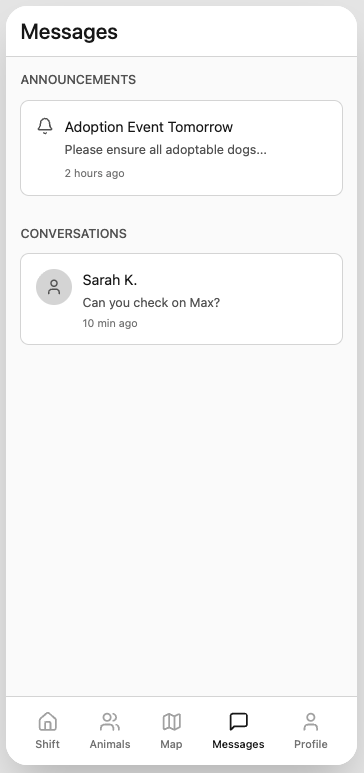
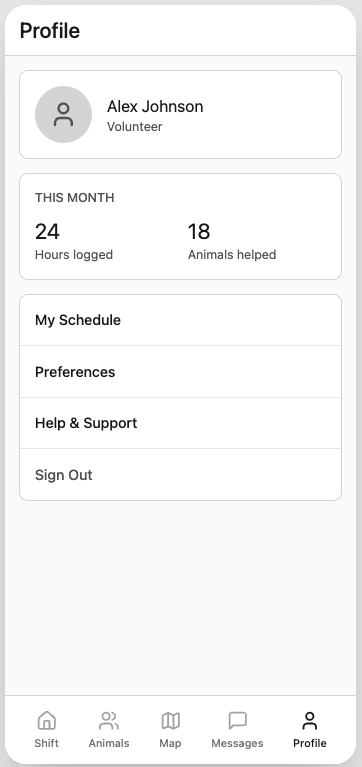
Core sections (Shift, Animals, Map, Messages) are accessible within one tap, reducing navigation time.
Structured data over free text
Lightweight tagging supports consistency, improves searchability, and reduces ambiguity.
Design Outputs
Over the course of the project, I developed:
Product concept and interaction model
Information architecture and sitemap
Mobile and tablet wireframes for core workflows
Content and metadata strategy
Research and usability testing plan
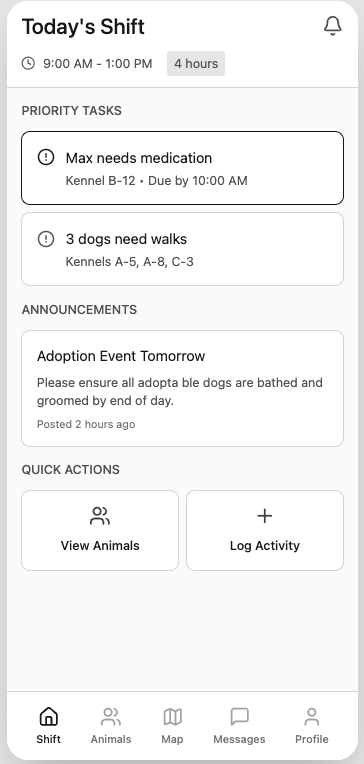
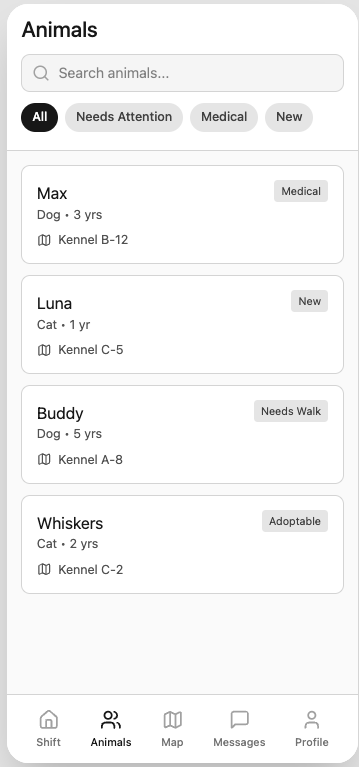
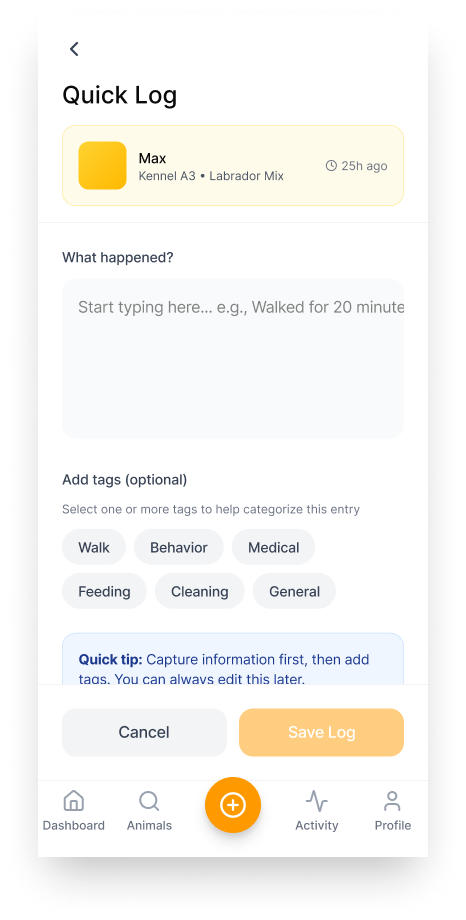
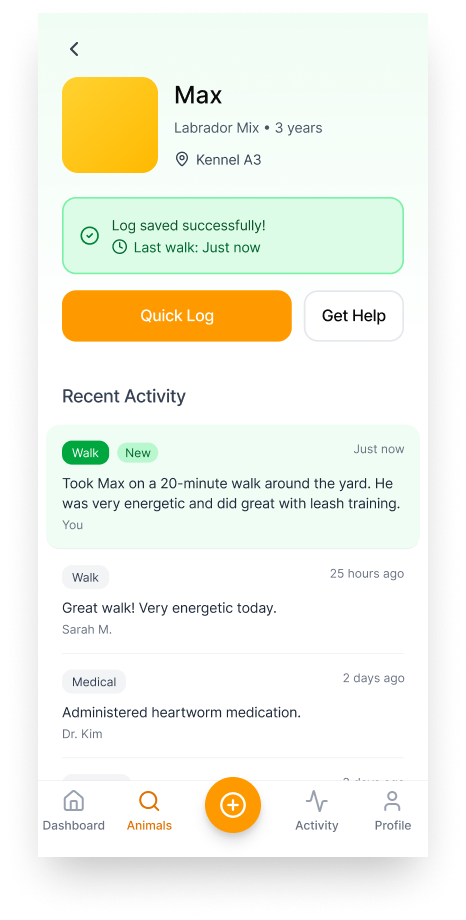
Wireframes
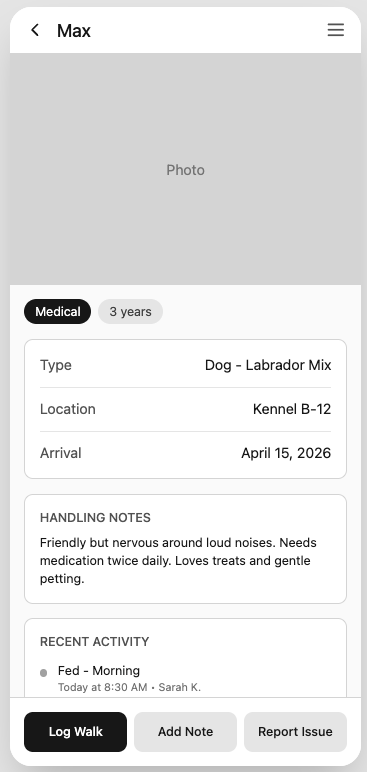
Goal of these wireframes:
To explore layout, hierarchy, and key interaction patterns, including search, quick logging, and navigation between workflows.
Research & Validation Approach
To reduce risk early, I validated the concept in two stages:
Discovery (Week 1–2)
Interviews with volunteer and coordinator equivalents to understand shift routines, pain points, and handoff breakdowns
Rapid workflow mapping to identify moments where volunteers need information “in motion”
Concept Validation (Week 3–4)
Task-based usability testing on low-fidelity wireframes (mobile-first)
Focused on core tasks:
Find a specific animal quickly
Understand key details (location, handling, status)
Log a walk or note
Flag an issue for follow-up
What We Heard
1) Volunteers think in “capture first, categorize later”
Participants wanted to quickly document what happened without immediately deciding how to categorize it. Forcing categorization too early slowed them down.
Implication: Logging should start as a general note, with optional tagging afterward.
2) Logging a walk alone wasn’t enough. Context matters
Participants understood logging a walk, but also wanted to capture what happened during the walk, such as energy level, behavior, or concerns.
Implication: Combine logging and note-taking into a single flexible interaction.
3) Volunteers needed clearer visibility into last care activity
Participants consistently looked for when an animal was last walked, whether it had been too long, and how to know if the animal needed attention.
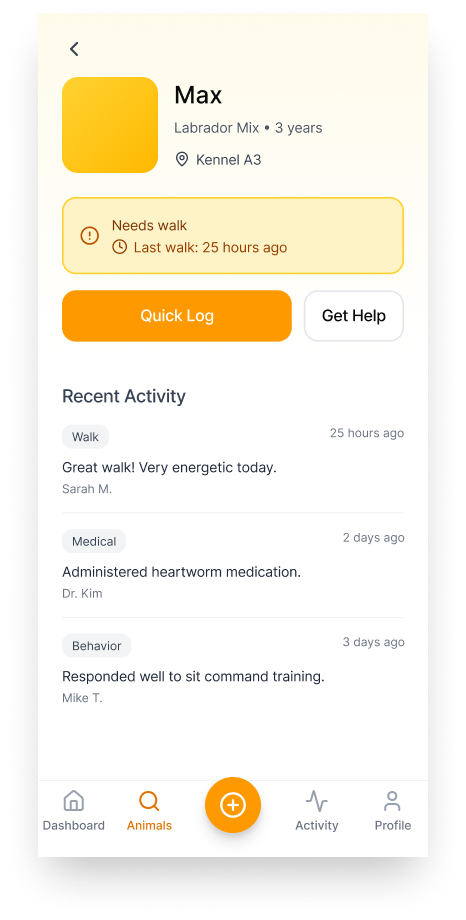
Implication: Surface the last walk timestamp and a clear “needs walk” indicator directly on the profile and directory.
4) Quick access to help or escalation was missing
When something felt wrong, participants wanted a fast and obvious way to flag the issue, notify someone, or get assistance without navigating away.
Implication: Include a persistent “Get Help” or “Report Issue” action.
5) Handoffs require visibility, not more documentation
Participants did not need longer notes. They needed to quickly understand what changed, what is new, and what needs attention.
Implication: Prioritize recent activity and timestamps over long histories.
Key Iterations Based on Validation
The final designs reflect several important improvements:
Logging supports capture-first behavior so volunteers can quickly record what happened before categorizing
Walk logging and note-taking are combined into a single flexible flow
Last walk visibility and “needs walk” indicators reduce uncertainty
A quick “Get Help” action supports escalation without friction
The design prioritizes recent activity and timestamps to improve continuity across shifts
Outcome
This project demonstrates how a focused product intervention can improve efficiency in a high-touch, volunteer-driven environment. By reducing friction in everyday workflows, the concept enables volunteers to spend less time managing information and more time caring for animals.